Teamspeak Support :: How to create a ServerQuery Login
-
Open TeamSpeak 3Open the TeamSpeak 3 program and connect to the server that you are wanting to create a Server Query user for.
When you create a Server Query user - your creating a user that has the same permissions as the user you are logged into TeamSpeak as. Example if I login to TeamSpeak as user "Xar98", and I create a Server Query user named "pinky" - "pinky" will have the same permissions and be in the same group as "Xar98". -
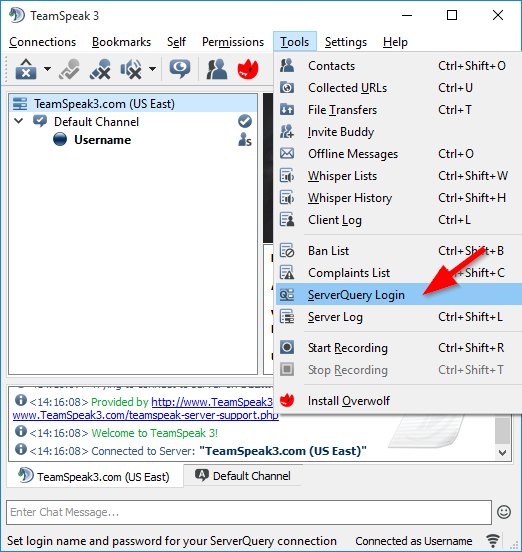
Server Query LoginAt the top of the TeamSpeak 3 program click the "Tools" menu then click the "ServerQuery Login" option.
-
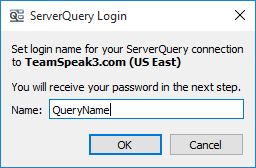
Create Query LoginType in the server query username you wish to create. Copy and paste the information that is generated for you to login with.
Please also note:
When connected via server query the TeamSpeak 3 Server will not allow more than 10 commands within 3 seconds from the same source or you will be banned for 5 minutes. (This cannot be changed per customer)
|
Links
|
Other Services
|
Account
|


|
© 2004-2024 LightSpeed Gaming LLC