Teamspeak Support :: How to add an icon to the TeamSpeak 3 server name
-
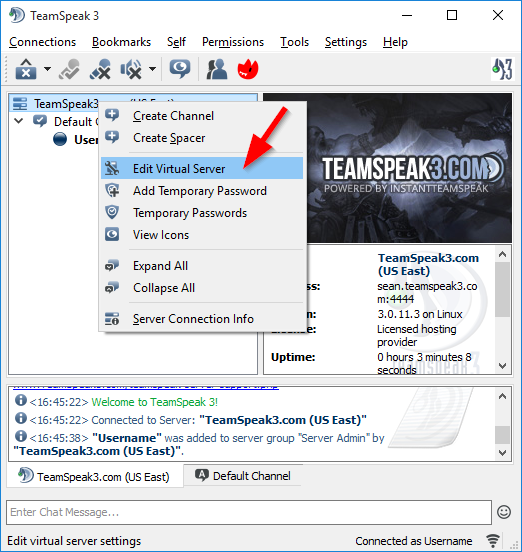
Open the "Edit Virtual Server" DialogRight click on your "Server Name" at the top of the TeamSpeak 3 window and select the "Edit Virutal Server" option.
-
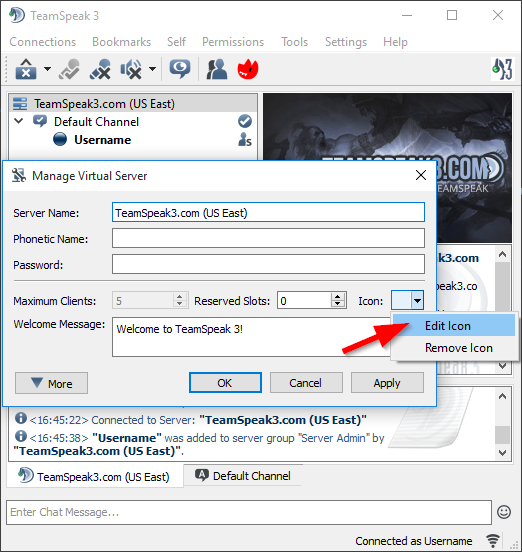
Adding the IconNext to "Icon:" you'll click the arrow button, then select "Edit Icon". This will allow you to view your icons avaiable to select from.
-
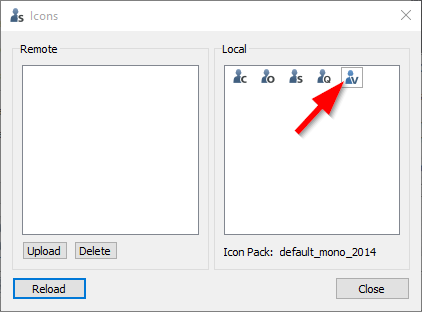
Select the IconYou can double click on the icon you want to select for the server name here.
-
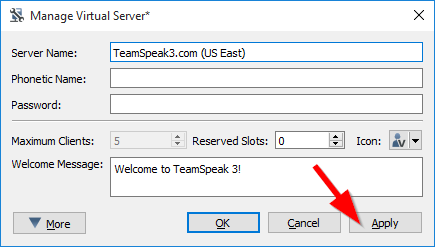
Apply the SettingsOn the "Manage Virtual Server" window you'll click the "Apply" button to save the changes to the server name icon. You should now see that the icon has been applied to the server name.
|
Links
|
Other Services
|
Account
|


|
© 2004-2024 LightSpeed Gaming LLC