Teamspeak Support :: How to change the channel codec in TeamSpeak 3
-
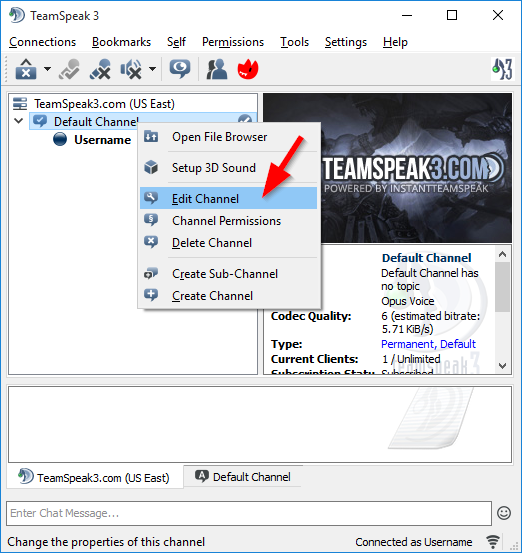
Edit the ChannelRight click on the channel you want to edit and select "Edit Channel".
-
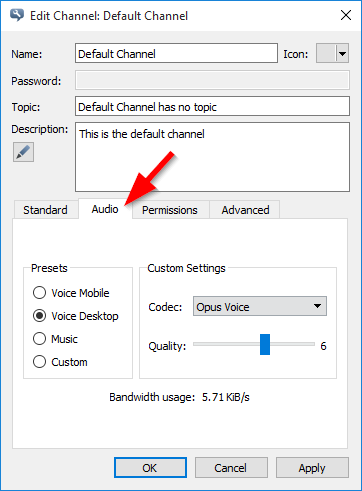
Audio SettingsClick the "Audio" tab to open the audio settings for the channel.
-
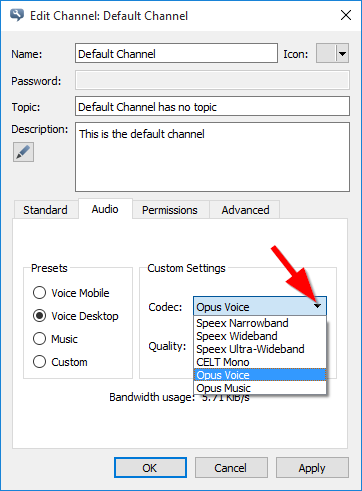
Selecting the new CodecSelect the codec you would like to use from the drop down menu.
-
Save the SettingsClick on the "Apply" button for the settings to take effect.
|
Links
|
Other Services
|
Account
|


|
© 2004-2024 LightSpeed Gaming LLC