Teamspeak Support :: How to use a privilege key in TeamSpeak 3
-
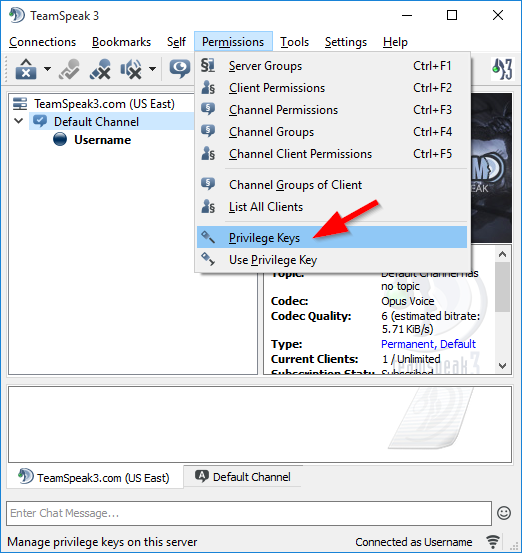
Open Privilege Key DialogAt the top of TeamSpeak click the "Permissions" menu then click the "Privilege Keys" option.
-
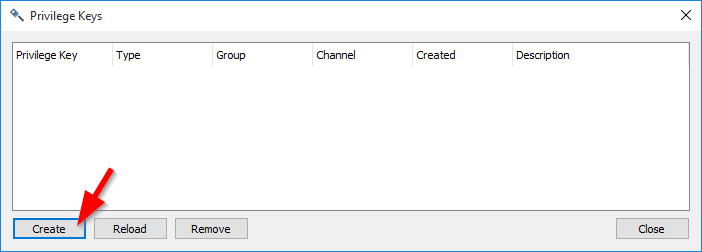
Create New Privilege KeyClick the "Create" button to bring up the window that will generate the key.
-
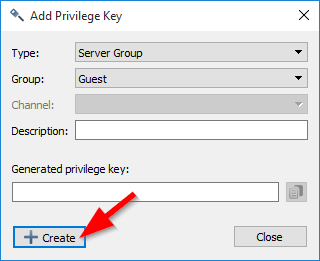
Add Key (continued)The first option is to create a type of group the key is for, more than likely you'll leave this to the default "Server Group". The second option is the group of which you'll want the key for. This is the actual group the key is for. Lastely you have the option of putting in a description of that the key is for so when you go back in into this window you'll know what the key was created for.
-
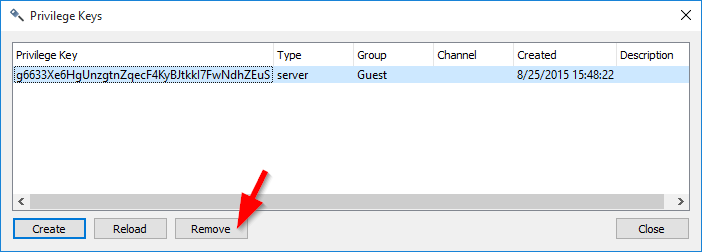
Remove Privilege KeyClick on the privilege key you wish you remove, then click on the "Remove Key" button at the bottom of the window.
|
Links
|
Other Services
|
Account
|


|
© 2004-2024 LightSpeed Gaming LLC